
The Pixel Margin parameter allows you to determine the margin of the resulting UV map in pixels of the active texture. In order to use this option set the Pixel Margin parameter to a value greater than zero. In such situation the standard Margin option will be ignored and packer will determine the correct pixel margin.
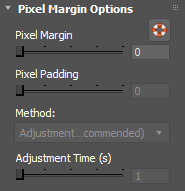
There are two methods of pixel margin determination Iterative and Adjustment Time.
IMPORTANT: starting from version 2.6 of the plugin the Iterative method is the only recommended method as it is significantly faster and always provides exact pixel margin. Adjustment Time is considered obsolete and should not be used. It is strongly recommended upgrading to version 2.6 because it provides a backport of the UVPackmaster 3 algorithm to the 3ds Max plugin.
Iterative (Recommended)
This method is recommended because it guarantees to always determine exact pixel margin. It is recommended to always combine this option with the Heuristic Search functionality
Adjustment Time (Obsolete)
This method determines the proper pixel margin by running an algorithm for a time specified by the Adjustment Time parameter. During this time packer will be determining what margin should be applied to the given UV map before packing, so that the resulting margin after packing is equal to the requested number of pixels. Such adjustment is required because in a general case the UV islands are scaled after packing is done (so they fit the unit UV square), so is the margin applied to the islands before packing. After the adjustment phase is done the actual packing process will begin.
Note that the pixel margin adjustment phase is not needed if the UV map is packed without scaling (the Fixed Scale option is on). In such situation the Adjustment Time option will be ignored.